
Hello there. It’s been a minute. This is part 2 of a however many part series – Refactoring Gobland. The first part is here if you care to read it.
This week I opened up a brand new project in Unity 6. There’s something satisfying about having a clean slate. There are no mistakes (yet) and nothing but possibility. It’s just nice to feel like I’m free of my technical debt, if only for a short while.
My goals with this new project are twofold. First, I want to build out a generic framework that I can use to set up just about any game we want to make going forward (with some modifications, obviously). Second, I want to learn more about Unity and grow my skills as a coder. This means learning some new tools and exploring new ways of doing things.
Now perhaps you are shocked- “wait!” you scream, “what about the Goblin Specific ground rule you laid out last time?” To which I respond, “thank you”. Your passion for holding me accountable to myself is laudatory but the truth is I wrote those words over a month ago. I can’t be held to the same standard a whole month later. I’ve changed- the world has changed. I need to get my game dev mojo back- if that means creating a “generic framework” now then so be it. We can get “Goblin Specific” later.
So, with that said, let’s start with the vision for a Unity generic game framework I’m calling SQYD.Core. Really it’s what WOFG! is already doing, but hopefully with more structure and less redundancy. Look here, I made a flowchart- everyone loves a flowchart!
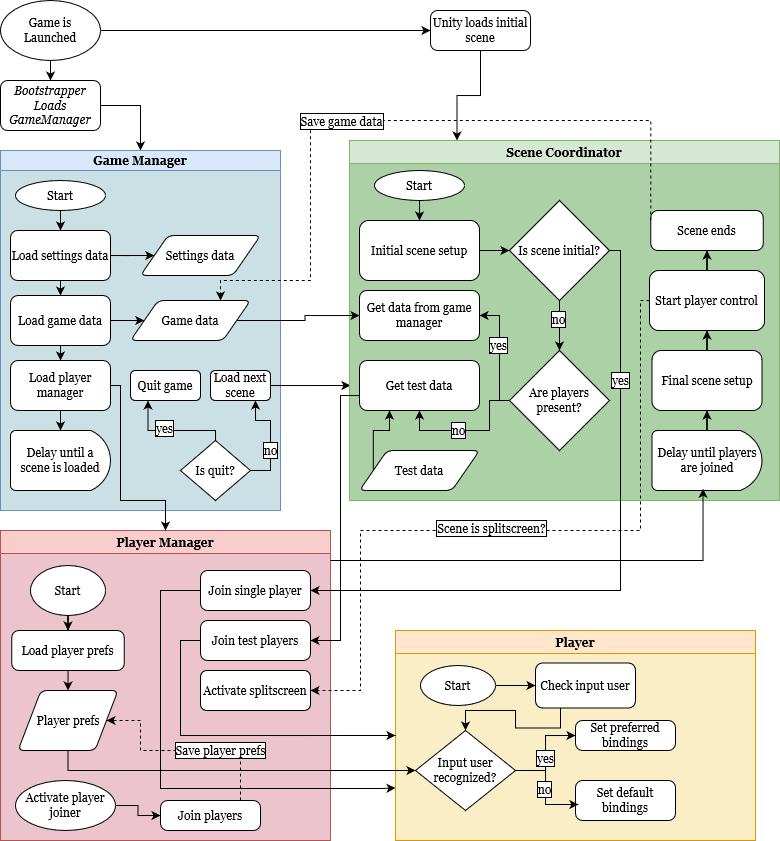
The big idea is to have some main tools for managing player input, save data, and scene setup that can work for a wide variety of projects. There are a few things that are very important to us. Specifically:
- Support local multiplayer. These tools need to support singleplayer, multiplayer, and splitscreen multiplayer. Bonus points if it can switch between the three on the fly.
- Built for easy testing. The setup needs to be able to launch any scene from the Unity editor for testing purposes. I want to be able to easily edit any GameData that gets loaded when testing for easy debugging.
- Take full advantage of Unity’s Input System. This means support for control rebinding, and appropriate gamepad glyphs/player prompts that are properly updated based on rebound controls.
- Lean on composition over inheritance. I wrote the current WOFG! code base building on computer science experience that was almost a decade old. Object-oriented programming was king. No more. In this rebuild I want smaller purpose built components that talk to each other by interface. I want to embrace using static utility classes to extend the functionality of existing types. Will I ever use inheritance? Maybe, but only when it solves a specific problem, not just to flex my comp sci 101 course from the ancient past.
- Let Unity do the work. When we started working on WOFG! I was more comfortable with C# than with Unity. As such, I wrote a bunch of custom classes that really just served to let me control built in Unity components through custom scripts. This was most evident with my CameraOperator class, which was basically duplicating a lot of the work a Cinemachine Virtual Camera was already doing. No more of this- I can access and work with the Unity component directly where I need to. The other half of this point is creating custom tools that let us do more design through the Unity editor. I’ve got a bunch of experience with custom editors now, the more I can expose my tools, the more Joel can work on the game without my input.
- Document as I go. I still want to support mods if at all possible. In addition to figuring out how to load asset packs (and all the Steam workshop integration stuff), I figure this means giving people access to at least some of my custom code base. I’m going to do my darndest to keep the code clear and readable, and most importantly document and clean up my classes as I go. I can understand all the code in the current WOFG! project is doing (mostly- please don’t ask any follow up questions), but I doubt it would be easy to parse for anyone else. This time I want to be more disciplined in writing code that is readable to all.
So how is this plan going? Thanks for asking, dev is chugging along at a decent pace. The usual expected waves of intense ambition, frustration, and smug satisfaction at finally making the thing work. All par for the course for game dev- at least in my experience.
I don’t really have anything concrete to share right now, and this blog is getting a little long in the tooth. So how about this: I’ll leave you with a note about Unity’s Input System. This is something I scratched my head on for hours, but I couldn’t find a clear answer online. Not in forums or in Unity’s official documentation. I don’t know if it’s a bug or if it’s intended behavior, but maybe you are, like me, searching for an answer. I hope you’ll find it here.
PSA: PlayerInput component will not “auto-switch” control schemes even when only one PlayerInput is present in the scene in Unity 6
So you have your control schemes set up in your InputActionAsset. Each scheme has a required controller, and you use the PlayerInputManager to join a single player. You move around with the gamepad, then you go to test the keyboard controls but nothing happens. The OnControlsChanged callback on PlayerInput never fires, even though the input debugger is receiving input from the keyboard, and joining is disabled. What madness is this! I know your pain, for I have felt it too.
The fix is very simple: just disable the PlayerInputManager. Like so:
PlayerInputManager.instance.enabled = false;And re-enable it when you need it again. For whatever reason, I can’t get the automatic control scheme switching to work in Unity 6 unless the PlayerInputManager is disabled.
I hope this helps you. If not, good luck with the debugging- remember the longer you struggle with it the better it will feel when you finally get it (probably, I don’t know you).
Anyway, thanks for reading to the very end. I’ll have more to say about my quest to Refactor Gobland soon. For now, I’m going to get back to it.
Until next time.
 SQYD.studio
Leave a comment